---
title: UI Density
order: 9000
seealso: []
---
# UI Density
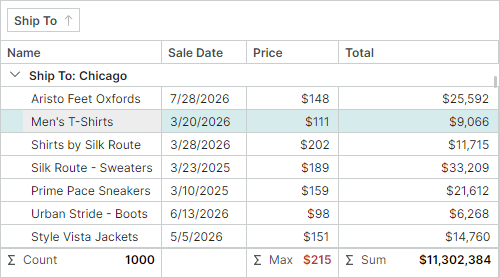
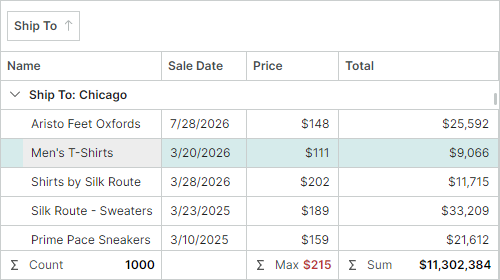
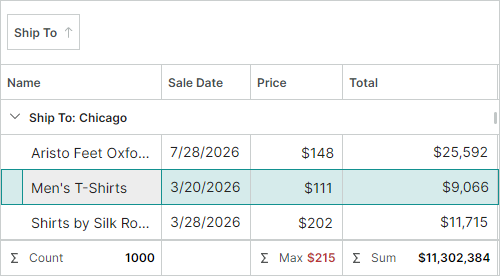
Applications sometimes need to maximize screen real estate or, conversely, provide a more spacious layout. To address these requirements, the `DeltaDesign` theme allows you to change the UI density to alter element padding and font sizes. Three predefined modes are available:
- `Compact`
- `Standard` (default)
- `Spacious`
## Modify the UI Density
To change the UI density, set the `DeltaDesignTheme.Density` property to an appropriate value from the `Eremex.AvaloniaUI.Themes.DeltaDesign.Density` enumeration.
The following example sets the UI density when [registering](https://eremexcontrols.net/controls/themes/register-an-eremex-paint-theme/index.md) the `DeltaDesign` theme in your _App.axaml_ file:
```xml
```
To change the UI density at runtime, locate the registered `DeltaDesign` theme in your application styles and update its `DeltaDesignTheme.Density` property:
```csharp
var deltaDesignTheme = Application.Current?.Styles.OfType().FirstOrDefault();
deltaDesignTheme.Density = Density.Compact;
```
## Create a Density Selector in the Application's UI
You can use the [IAppeanceService](https://eremexcontrols.net/controls/app-services/appearanceservice/index.md) object to manage `DeltaDesign` theme options, including color palettes, UI density, and theme variants. [`IAppearanceService`](https://eremexcontrols.net/API/Eremex.AvaloniaUI.Controls.ApplicationServices/IAppearanceService/index.md) allows you to change theme options in code. It also facilitates the creation of selector controls in your UI (such as a ribbon gallery, a combo box, or a menu) to let users switch theme options at runtime.
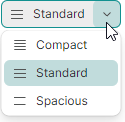
The following image demonstrates a combo box used as a selector for UI density options.
See the following topic for more information: [Example - Create a Density Selector](https://eremexcontrols.net/controls/app-services/appearanceservice/index.md#example-create-a-density-selector)