---
title: Summaries
order: 3950
seealso: []
---
# Summaries
The TreeList control allows you to calculate total summaries for columns. Total summaries are aggregate functions computed across all rows. The control must have simultaneous access to all rows to correctly calculate total summaries.
!!! Note
Set the [`AllowDynamicDataLoading`](https://eremexcontrols.net/API/Eremex.AvaloniaUI.Controls.TreeList/TreeListControlBase/AllowDynamicDataLoading/index.md) property to `false` to disable [dynamic data loading](https://eremexcontrols.net/controls/treelist/data-binding/binding-to-hierarchical-data/index.md#dynamic-data-load) and provide simultaneous access to all rows for the TreeList control.
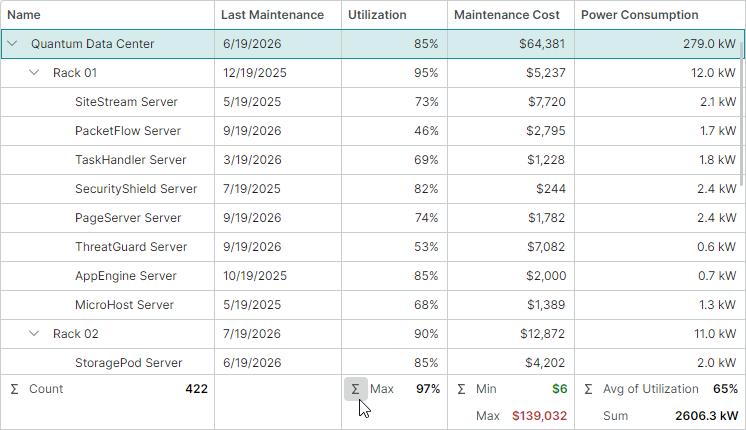
The main summary calculation features include:
- Built-in summary functions: Sum, Min, Max, Count, and Average.
- Runtime management — Users can click the Σ button in the footer cell to add summaries or invoke the Summary Editor dialog for advanced summary operations.
- Multiple summaries per column — Each column can display multiple summaries calculated across that column's values.
- Cross-column summaries — You can calculate a summary against one column and display it in another.
- Custom summaries — You can handle the [`CustomSummary`](https://eremexcontrols.net/API/Eremex.AvaloniaUI.Controls.TreeList/TreeListControl/CustomSummary/index.md) event to calculate a custom aggregate function according to your logic.
## Enable Total Summaries
Total summaries are shown in the control's footer.
Set the [`ShowTotalSummaries`](https://eremexcontrols.net/API/Eremex.AvaloniaUI.Controls.TreeList/TreeListControl/ShowTotalSummaries/index.md) property to `true` to display the summary footer and enable total summary calculation. The summary footer is positioned at the bottom of the [`TreeListControl`](https://eremexcontrols.net/API/Eremex.AvaloniaUI.Controls.TreeList/TreeListControl/index.md), below all rows. Initially, this footer is hidden.
```xml
...
```
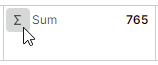
The summary footer contains summary cells for all columns. If [user summary customization](#user-summary-customizations) is enabled (default), the summary cells contain the `Σ` button used to show a summary menu and the summary editor.
**Related API**
- [`ShowTotalSummaries`](https://eremexcontrols.net/API/Eremex.AvaloniaUI.Controls.TreeList/TreeListControl/ShowTotalSummaries/index.md) — Gets or sets whether the total summary footer is displayed and total summary calculation is enabled.
- [`TotalSummaryPanelMinHeight`](https://eremexcontrols.net/API/Eremex.AvaloniaUI.Controls.TreeList/TreeListControl/TotalSummaryPanelMinHeight/index.md) — Gets or sets the minimum height of the total summary footer.
## Define Total Summaries
Use the [`TotalSummaries`](https://eremexcontrols.net/API/Eremex.AvaloniaUI.Controls.TreeList/TreeListControl/TotalSummaries/index.md) collection to define total summaries. Items in this collection are instances of the [`SummaryItem`](https://eremexcontrols.net/API/Eremex.AvaloniaUI.Controls.DataControl/SummaryItem/index.md) class. Each [`SummaryItem`](https://eremexcontrols.net/API/Eremex.AvaloniaUI.Controls.DataControl/SummaryItem/index.md) object specifies the field to summarize, the summary type, the column in which to display the result, and other settings.
```xml
xmlns:mxdc="clr-namespace:Eremex.AvaloniaUI.Controls.DataControl;assembly=Eremex.Avalonia.Controls"
```
**Related API**
- [`TotalSummaries`](https://eremexcontrols.net/API/Eremex.AvaloniaUI.Controls.TreeList/TreeListControl/TotalSummaries/index.md) — Provides access to the collection of summary items ([`SummaryItem`](https://eremexcontrols.net/API/Eremex.AvaloniaUI.Controls.DataControl/SummaryItem/index.md) objects) that define total summaries.
- [`SummaryItem.FieldName`](https://eremexcontrols.net/API/Eremex.AvaloniaUI.Controls.DataControl/SummaryItem/FieldName/index.md) — Gets or sets the name of the data field whose values are used to calculate the summary.
- [`SummaryItem.Name`](https://eremexcontrols.net/API/Eremex.AvaloniaUI.Controls.DataControl/SummaryItem/Name/index.md) — Gets or sets the summary item's name, used to identify it. You can retrieve summary items by name from the [`TotalSummaries`](https://eremexcontrols.net/API/Eremex.AvaloniaUI.Controls.TreeList/TreeListControl/TotalSummaries/index.md) collection.
- [`SummaryItem.Tag`](https://eremexcontrols.net/API/Eremex.AvaloniaUI.Controls.DataControl/SummaryItem/Tag/index.md) — Gets or sets custom data associated with this SummaryItem.
- [`SummaryItem.ShowInColumn`](https://eremexcontrols.net/API/Eremex.AvaloniaUI.Controls.DataControl/SummaryItem/ShowInColumn/index.md) — Gets or sets the field name of the column that displays the summary value. If this property is not set, the summary is displayed in the column bound to `FieldName`.
- [`SummaryItem.SummaryType`](https://eremexcontrols.net/API/Eremex.AvaloniaUI.Controls.DataControl/SummaryItem/SummaryType/index.md) — Gets or sets the type of the aggregate function (`Sum`, `Min`, `Max`, `Count`, or `Average`).
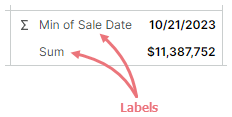
- [`SummaryItem.Label`](https://eremexcontrols.net/API/Eremex.AvaloniaUI.Controls.DataControl/SummaryItem/Label/index.md) — Gets or sets a custom label to display instead of the default summary label. The default summary label displays the name of the summary function. If the summary is displayed in another column (see [`ShowInColumn`](https://eremexcontrols.net/API/Eremex.AvaloniaUI.Controls.DataControl/SummaryItem/ShowInColumn/index.md)), the summary label also displays the caption of the column bound to [`SummaryItem.FieldName`](https://eremexcontrols.net/API/Eremex.AvaloniaUI.Controls.DataControl/SummaryItem/FieldName/index.md).
## User Summary Customizations
The control allows users to edit summaries at runtime by default. In this mode, summary cells display the `Σ` button, used to invoke the summary menu:
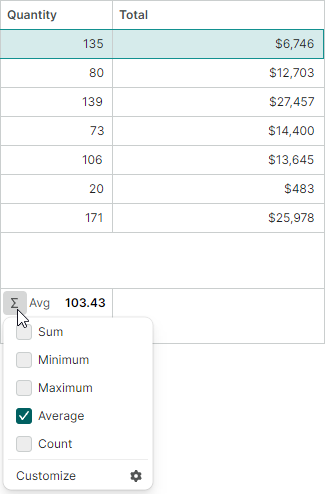
Users can use this menu to:
- Add or remove summaries by toggling checkboxes next to summary functions.
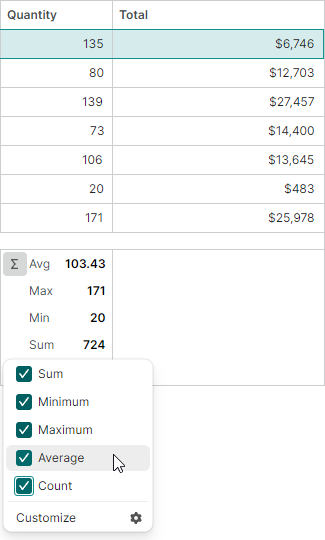
- Select `Customize` to invoke the `Summary Editor` dialog.
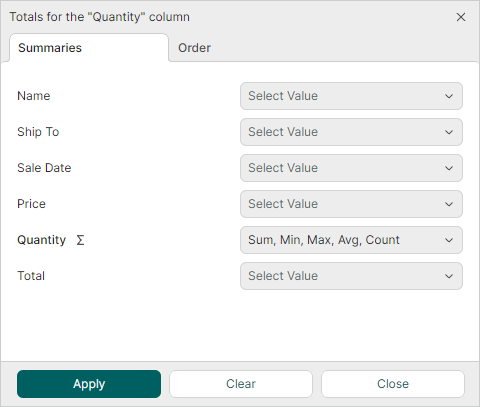
In this dialog's `Summaries` tab, users can create cross-column summaries (summaries calculated for one column, but shown in another column).
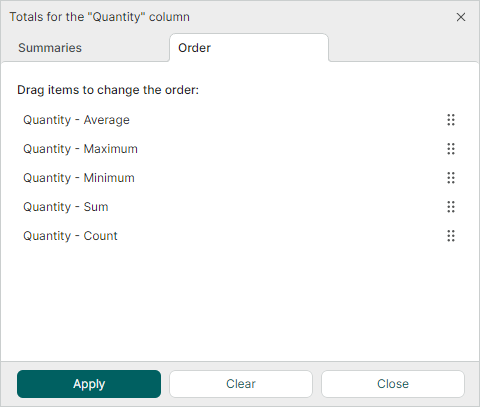
The `Order` tab allows users to change the display order of the existing summaries.
**Related API**
- [`AllowEditingTotalSummaries`](https://eremexcontrols.net/API/Eremex.AvaloniaUI.Controls.TreeList/TreeListControl/AllowEditingTotalSummaries/index.md) — Gets or sets whether users can edit total summaries.
This property only affects user capabilities to modify summaries and does not impact summary calculations performed in code.
## Custom Summaries
Custom summaries allow you to calculate aggregate values using your own logic.
To add a custom summary, do the following:
- Create a [`SummaryItem`](https://eremexcontrols.net/API/Eremex.AvaloniaUI.Controls.DataControl/SummaryItem/index.md) object and set its [`SummaryItem.SummaryType`](https://eremexcontrols.net/API/Eremex.AvaloniaUI.Controls.DataControl/SummaryItem/SummaryType/index.md) property to `Custom`.
- Add this [`SummaryItem`](https://eremexcontrols.net/API/Eremex.AvaloniaUI.Controls.DataControl/SummaryItem/index.md) to the [`TotalSummaries`](https://eremexcontrols.net/API/Eremex.AvaloniaUI.Controls.TreeList/TreeListControl/TotalSummaries/index.md) collection.
- Handle the [`CustomSummary`](https://eremexcontrols.net/API/Eremex.AvaloniaUI.Controls.TreeList/TreeListControl/CustomSummary/index.md) event to manually calculate a value for this [`SummaryItem`](https://eremexcontrols.net/API/Eremex.AvaloniaUI.Controls.DataControl/SummaryItem/index.md).
Set the `e.SummaryValue` event parameter to supply your custom result.
While handling the [`CustomSummary`](https://eremexcontrols.net/API/Eremex.AvaloniaUI.Controls.TreeList/TreeListControl/CustomSummary/index.md) event, use the `e.Nodes` collection to iterate through target nodes (rows).
### Example - Calculate a custom total summary
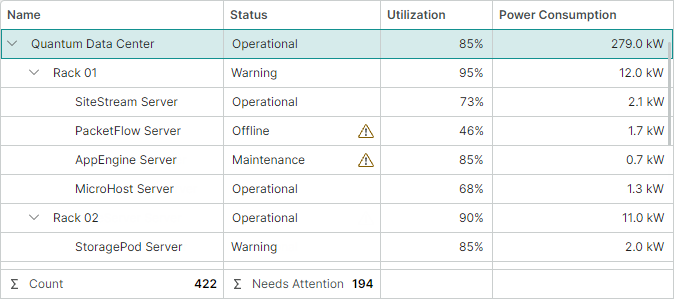
The following example creates a custom total summary (called "Needs Attention") that calculates the number of assets requiring attention. These assets have a status of _Maintenance_, _Degraded_, _Offline_, or _Decommissioned_.
```xml
```
```csharp
// Code-behind
void OnCustomSummary(object sender, TreeListCustomSummaryEventArgs e)
{
int assetsRequiringAttention = 0;
foreach (var node in e.Nodes)
{
var status = (AssetStatus)treeList.GetCellValue(node, e.SummaryItem.FieldName);
if (status is AssetStatus.Maintenance or AssetStatus.Degraded or AssetStatus.Offline or AssetStatus.Decommissioned)
assetsRequiringAttention++;
}
e.SummaryValue = assetsRequiringAttention;
}
```
**Related API**
- [`CustomSummary`](https://eremexcontrols.net/API/Eremex.AvaloniaUI.Controls.TreeList/TreeListControl/CustomSummary/index.md) — Occurs when a summary value is calculated. Use the [`SummaryValue`](https://eremexcontrols.net/API/Eremex.AvaloniaUI.Controls.TreeList/TreeListCustomSummaryEventArgs/SummaryValue/index.md) event parameter to supply a custom summary value.
## Get Summary Values
You can retrieve calculated summary values in code using the following API:
- [`TreeListControl.GetTotalSummaryValue`](https://eremexcontrols.net/API/Eremex.AvaloniaUI.Controls.TreeList/TreeListControl/GetTotalSummaryValue/index.md) — Returns the calculated value of a total summary.
```csharp
object? totalValue = treeList.GetTotalSummaryValue(summaryItem);
```