IWindowService
IWindowService 提供了一种与平台无关的方式,用于从 ViewModel 中显示非模态窗口。ViewModel 与 Avalonia 窗口类型完全解耦。
主要功能包括:
- 显示非模态窗口。
- 由 ViewModel 驱动的窗口 — 所显示的窗口由自定义 ViewModel 定义。您可以使用 ViewModel 的
Content属性,或使用应用于窗口 ViewModel 的ViewLocatorAttribute来指定目标窗口的内容。 - 自动设置所有者 — 应用程序的活动窗口将成为目标窗口的所有者。活动窗口通过
IWindowsManager服务自动解析。
接口定义
public interface IWindowService
{
    // Show a non-modal window driven by a ViewModel.
    void Show<T>(T viewModel, string? caption = null)
        where T : IWindowAwareViewModel;
}
| 参数 | 类型 | 说明 |
|---|---|---|
viewModel |
T |
要显示的目标窗口的 ViewModel。viewModel 对象必须实现 IWindowAwareViewModel 接口。您可以从 WindowAwareViewModel 类派生窗口的 ViewModel,该类已实现此接口并增加了 View 定位基础结构。 |
caption |
string? |
窗口标题。设置为 null 时,标题取自 ViewModel 的 Title 属性(IWindowAwareViewModel.Title)。 |
Show 方法在显示窗口后立即返回,不会等待窗口关闭。
异常:
ArgumentNullException— 如果viewModel参数为null。
如何使用 IWindowService
- 为目标非模态窗口创建一个 ViewModel。例如,可以从
WindowAwareViewModel类派生。 -
使用以下方式之一指定目标窗口的内容:
- 定义一个表示目标窗口内容的 View(
UserControl)。为 ViewModel 设置ViewLocatorAttribute,将该 ViewModel 与所创建的 View 关联起来。 - 显式设置窗口 ViewModel 的
Content属性(WindowAwareViewModel.Content)。
- 定义一个表示目标窗口内容的 View(
-
在需要显示目标窗口的 ViewModel 中,调用
IWindowService.Show方法,并将目标窗口的 ViewModel 传递给Show方法。Show方法会立即返回,所显示的窗口将保持打开,直到用户将其关闭。
访问服务
在 ViewModel 中访问 IWindowService 对象有两种方式:
- 通过
Service<T>()辅助方法。这是获取 Eremex Controls 库附带的已注册应用程序服务的便捷方法。 - 通过构造函数注入。
Service() 辅助方法
在 ViewModel 中实现一个 Service<T>() 辅助方法,通过静态方法 ApplicationServicesContext.GetRequiredService<T>() 获取所请求的服务。
using Eremex.AvaloniaUI.Controls.ApplicationServices;
using CommunityToolkit.Mvvm.Input;

public partial class MyViewModel : ObservableObject
{
    // Provides access to any registered service
    protected static T Service<T>() where T : class
        => ApplicationServicesContext.GetRequiredService<T>();

    [RelayCommand]
    private void ShowWindow()
    {
        // Resolve the service and show the window
        Service<IWindowService>().Show(
            new MyWindowViewModel("Non-modal window"));
    }
}
在 App.axaml.cs 文件中,确保按如下方式使用 SimpleServiceProvider 和 ApplicationServicesContext 注册 Eremex 应用程序服务:
public class App : Application
{
    public override void OnFrameworkInitializationCompleted()
    {
        RegisterApplicationServices();
        //...
    }

    static void RegisterApplicationServices()
    {
        // Register built-in services.
        var serviceProvider = new SimpleServiceProvider();
        ApplicationServicesContext.RegisterApplicationServices(serviceProvider.AddSingleton);
        ApplicationServicesContext.SetCurrent(serviceProvider);
    }
}
构造函数注入
在 ViewModel 中实现一个以 IWindowService 为参数的构造函数。实例化 ViewModel 时,将服务对象传递给该构造函数。
public partial class MyViewModel
{
    private readonly IWindowService _windowService;

    public MyViewModel(IWindowService windowService)
    {
        _windowService = windowService;
    }

    [RelayCommand]
    private void ShowWindow()
    {
        _windowService.Show(new MyWindowViewModel("Non-modal window"));
    }
}
创建窗口的 ViewModel
您需要为要显示的非模态窗口创建一个 ViewModel。该 ViewModel 必须实现 IWindowAwareViewModel 接口。最简单的方法是从 WindowAwareViewModel 类派生 ViewModel,该类已实现 IWindowAwareViewModel 接口并负责 View 定位。
使用 ViewLocatorAttribute 定义窗口内容
- 创建一个 View(
UserControl),其中包含要在目标窗口中显示的控件。 - 使用
ViewLocatorAttribute修饰窗口的 ViewModel,并传入 View 的类型。
调用 IWindowService.Show 方法时,ViewModel 会创建一个 Avalonia 窗口,实例化指定的 View(UserControl),并将其作为窗口内容放入窗口中。ViewModel 永远无需直接引用 View 类型。
示例
以下示例使用 IWindowService 服务显示一个非模态窗口,其内容由自定义 View 指定。
完整代码请参阅 演示应用程序 应用程序。
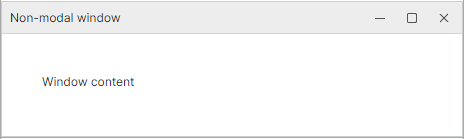
非模态窗口的 ViewModel
using Eremex.AvaloniaUI.Controls.ApplicationServices;

[ViewLocator(typeof(WindowServiceWindowView))]
public class WindowServiceWindowViewModel : WindowAwareViewModel
{
    private string statusText;

    public string StatusText
    {
        get => statusText;
        private set
        {
            if (statusText == value)
                return;

            statusText = value;
            OnPropertyChanged(nameof(StatusText));
        }
    }
}
非模态窗口的内容(View)
<UserControl x:Class="DemoCenter.Views.ApplicationServices.WindowServiceWindowView"
             xmlns="https://github.com/avaloniaui"
             xmlns:x="http://schemas.microsoft.com/winfx/2006/xaml"
             xmlns:vm="using:DemoCenter.ViewModels.ApplicationServices"
             x:CompileBindings="True"
             x:DataType="vm:WindowServiceWindowViewModel"
             MinWidth="420">

    <StackPanel Margin="20" Spacing="12">
        <TextBlock Text="Window content"
                   TextWrapping="Wrap" />

    </StackPanel>
</UserControl>
显示窗口
[RelayCommand]
private void ShowWindow()
{
    string windowTitle = "Non-modal window";
    Service<IWindowService>().Show(new WindowServiceWindowViewModel(windowTitle));
}
直接定义窗口内容
使用 ViewModel 的 Content 属性(WindowAwareViewModel.Content)显式提供窗口内容。
using Eremex.AvaloniaUI.Controls.ApplicationServices;

public class MyWindowViewModel : WindowAwareViewModel
{
    public MyWindowViewModel(string title) : base(title)
    {
        Content = "Window content";
    }
}
要显示此窗口,请使用以下代码:
窗口标题
可以使用以下方式之一指定窗口标题:
- 设置
IWindowService.Show方法的caption参数。 - 设置窗口 ViewModel 的
Title属性。当IWindowService.Show方法的caption参数为null时,此属性生效。
所有者窗口
所有者通过 IWindowsManager 服务自动确定。该服务返回的应用程序活动窗口将成为目标窗口的所有者。
* 本页面使用机器翻译技术翻译。