IOpenFileDialogService and ISaveFileDialogService
IOpenFileDialogService and ISaveFileDialogService provide a platform-agnostic way to show the system's Open File and Save File dialogs from your ViewModels. The ViewModels remain completely decoupled from Avalonia window types.
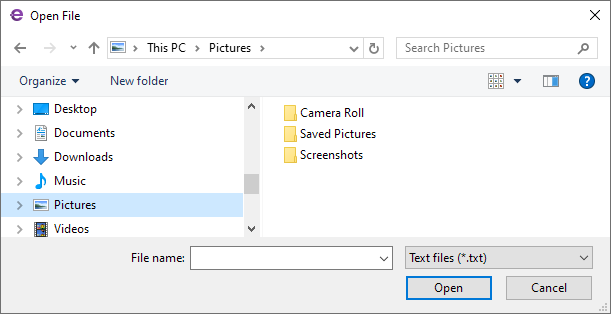
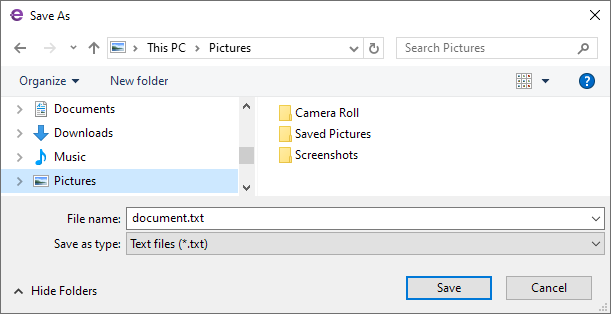
Main features include:
- Platform Open File and Save File dialogs — The services show the file pickers provided by the operating system.
- Synchronous and asynchronous variants — Each service exposes a synchronous
Showmethod and an asynchronousShowAsyncmethod. - Configurable file dialog options — The file dialogs allow you to customize the dialog's caption, file type filters, starting folder, suggested file name, default extension, overwrite prompt, and multiple selection mode.
- Automatic owner — The active application window resolved through the
IWindowsManagerservice becomes the owner of the dialog.
Interface Definitions
IOpenFileDialogService
public interface IOpenFileDialogService
{
    // Show an Open File dialog and block the calling thread until the user closes the dialog.
    string[] Show(IWindow? owner = null, OpenFileDialogOptions? options = null);

    // Show an Open File dialog without blocking the calling thread.
    Task<string[]> ShowAsync(IWindow? owner = null, OpenFileDialogOptions? options = null);
}
| Parameter | Type | Description |
|---|---|---|
owner |
IWindow? |
The owner of the dialog. When this parameter is null, the active application window becomes the dialog's owner. |
options |
OpenFileDialogOptions? |
The dialog configuration options, which include the caption, filters, start folder, multiple selection, and more. When this parameter is null, the default platform options apply. |
Returns:
Show— Returns the selected file paths, or an empty array if the user cancelled the dialog or no owner window could be resolved.ShowAsync— Returns a task that completes when the dialog closes, carrying the selected file paths. Returns an empty array if the user cancelled the dialog.
ISaveFileDialogService
public interface ISaveFileDialogService
{
    // Show a Save File dialog and block the calling thread until the user closes the dialog.
    string? Show(IWindow? owner = null, SaveFileDialogOptions? options = null);

    // Show a Save File dialog without blocking the calling thread.
    Task<string?> ShowAsync(IWindow? owner = null, SaveFileDialogOptions? options = null);
}
| Parameter | Type | Description |
|---|---|---|
owner |
IWindow? |
The owner of the dialog. When this parameter is null, the active application window becomes the dialog's owner. |
options |
SaveFileDialogOptions? |
The dialog configuration options, which include the caption, filters, start folder, suggested file name. When this parameter is null, the default platform options apply. |
Returns:
Show— Returns the selected path, ornullif the user cancelled the dialog or no owner window could be resolved.ShowAsync— Returns a task that completes when the dialog closes, carrying the selected path, ornullif the user cancelled the dialog.
Dialog Owner
The owner parameter of the Show and ShowAsync methods is of type IWindow. The IWindow interface is an abstraction of a window without tying your code to Avalonia window types. The service implementation converts it to the actual Avalonia Window internally. To obtain an IWindow object that represents the currently active window in your code, you can use the IWindowsManager service.
Options
OpenFileDialogOptions
When you invoke the Show and ShowAsync methods of an IOpenFileDialogService, you can customize file dialog options using the options parameter. This parameter is of the OpenFileDialogOptions class.
public class OpenFileDialogOptions
{
    public string? Title { get; set; }
    public bool? AllowMultiple { get; set; }
    public string? DefaultFolder { get; set; }
    public string? Filter { get; set; }
}
| Property | Description |
|---|---|
Title |
The dialog's caption. |
AllowMultiple |
true to allow a user to select multiple files at once. Defaults to false. |
DefaultFolder |
The full path of the folder the dialog shows initially. |
Filter |
The file type filters. When left unset, all files are shown. Example: "Images\|*.png;*.jpg\|All files\|*.*". |
SaveFileDialogOptions
public class SaveFileDialogOptions
{
    public string? Title { get; set; }
    public string? Filter { get; set; }
    public IReadOnlyList<FileDialogFileType>? FilterFileTypes { get; set; }
    public string? DefaultFolder { get; set; }
    public FileDialogFolder? DefaultWellKnownFolder { get; set; }
    public string? DefaultExtension { get; set; }
    public string? InitialFileName { get; set; }
    public bool ShowOverwritePrompt { get; set; }
}
| Property | Description |
|---|---|
Title |
The dialog's caption. |
Filter |
The file type filters, as a string. Example: "Images\|*.png;*.jpg\|All files\|*.*". This property is ignored when FilterFileTypes is used. |
FilterFileTypes |
The file type filters as a collection of FileDialogFileType objects. Takes precedence over Filter when set. |
DefaultFolder |
The default folder, as a full path. Takes precedence over DefaultWellKnownFolder. |
DefaultWellKnownFolder |
The default folder, as a well-known folder: Desktop, Documents, Downloads, Music, Pictures, or Videos. This property is ignored when DefaultFolder is set. |
DefaultExtension |
The default file extension without dots or wildcards. Example: "xml". |
InitialFileName |
The initial file name suggested in the dialog. |
ShowOverwritePrompt |
When this property is true, the dialog warns the user if the target file already exists. |
How to Use the File Dialog Services
In your ViewModel, call Show or ShowAsync on the file dialog service. These methods' return values allow you to obtain the path or paths the user selected.
Access the Service
There are two ways to access an IOpenFileDialogService or ISaveFileDialogService object in a ViewModel:
- Through the
Service<T>()helper method. This is a convenient approach to obtain registered application services shipped with the Eremex Controls library. - Through constructor injection.
Service() Helper
Implement a helper Service<T>() method in your ViewModel to get a requested service using the static ApplicationServicesContext.GetRequiredService<T>() method.
using Eremex.AvaloniaUI.Controls.ApplicationServices;
using CommunityToolkit.Mvvm.Input;

public partial class MyViewModel : ObservableObject
{
    // Provides access to any registered service
    protected static T Service<T>() where T : class
        => ApplicationServicesContext.GetRequiredService<T>();

    [RelayCommand]
    private async Task OpenFile()
    {
        var files = await Service<IOpenFileDialogService>().ShowAsync(
            options: new OpenFileDialogOptions
            {
                Title = "Open file",
                Filter = "Text files|*.txt|All files|*.*",
            });
    }
}
In the App.axaml.cs file, ensure that Eremex application services are registered using SimpleServiceProvider and ApplicationServicesContext as follows:
public class App : Application
{
    public override void OnFrameworkInitializationCompleted()
    {
        RegisterApplicationServices();
        //...
    }

    static void RegisterApplicationServices()
    {
        // Register built-in services.
        var serviceProvider = new SimpleServiceProvider();
        ApplicationServicesContext.RegisterApplicationServices(serviceProvider.AddSingleton);
        ApplicationServicesContext.SetCurrent(serviceProvider);
    }
}
Constructor Injection
Implement a constructor in your ViewModel with the service as a parameter. When you instantiate the ViewModel, pass the service object to this constructor.
public partial class MyViewModel
{
    private readonly IOpenFileDialogService _openFileDialogService;

    public MyViewModel(IOpenFileDialogService openFileDialogService)
    {
        _openFileDialogService = openFileDialogService;
    }

    [RelayCommand]
    private async Task OpenFile()
    {
        var files = await _openFileDialogService.ShowAsync(
            options: new OpenFileDialogOptions
            {
                Title = "Open file",
                Filter = "Text files|*.txt|All files|*.*",
            });
    }
}
Example - Open a File Synchronously
[RelayCommand]
private void OpenFileSync()
{
    var files = Service<IOpenFileDialogService>().Show(options: new OpenFileDialogOptions
    {
        Title = "Open File",
        Filter = "Images|*.png;*.jpg|All files|*.*"
    });

}
Example - Open a File Asynchronously
[RelayCommand]
private async Task OpenFileAsync()
{
    var files = await Service<IOpenFileDialogService>().ShowAsync(options: new OpenFileDialogOptions
    {
        Title = "Open File",
        Filter = "Text files|*.txt|All files|*.*"
    });
}
Example - Open Multiple Files
Set the OpenFileDialogOptions.AllowMultiple property to true to allow a user to pick more than one file.
[RelayCommand]
private void OpenMultipleFilesSync()
{
    var files = Service<IOpenFileDialogService>().Show(options: new OpenFileDialogOptions
    {
        Title = "Open File",
        AllowMultiple = true,
        Filter = "Text files|*.txt|All files|*.*"
    });
}
Example - Save a File Synchronously
[RelayCommand]
private void SaveFileSync()
{
    var path = Service<ISaveFileDialogService>().Show(options: new SaveFileDialogOptions
    {
        Title = "Save File",
        Filter = "Images|*.png;*.jpg|All files|*.*"
    });

}
Example - Save a File Asynchronously
[RelayCommand]
private async Task SaveFileAsync()
{
    var path = await Service<ISaveFileDialogService>().ShowAsync(options: new SaveFileDialogOptions
    {
        Title = "Save File",
        Filter = "Text files|*.txt|All files|*.*",
        DefaultExtension = "txt",
        InitialFileName = "document.txt",
        ShowOverwritePrompt = true,
    });

}