IMessageBoxService
IMessageBoxService provides a platform-agnostic way to show standard message boxes from your ViewModels. The ViewModels remain completely decoupled from Avalonia window types.
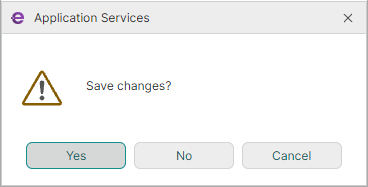
Main features:
- Fixed button sets — Message boxes can display fixed button sets defined by the
MessageBoxButtonsenumeration (such as Ok, Ok|Cancel, Yes|No|Cancel, Yes|No, Abort|Retry|Ignore, and Retry|Cancel). - Automatic owner resolving — The service can automatically resolve the owner window through the
IWindowsManagerservice. You can also explicitly specify an owner for message boxes, when required. - Get the message box result — After the message box is closed, it returns the result specified by the
DialogResultenumeration.
Interface Definition
public interface IMessageBoxService
{
    // Show a message box with an explicit owner.
    DialogResult Show(IWindow? owner, string text, string caption, MessageBoxButtons buttons, MessageBoxIcon icon);

    // Show a message box with the default owner (the active window detected through the `IWindowsManager` service).
    DialogResult Show(string text, string caption, MessageBoxButtons buttons, MessageBoxIcon icon);
}
Use IMessageBoxService
In your ViewModel, call the IMessageBoxService.Show method of the service object to display a message box. The method returns the message box result (the button the user pressed).
The IMessageBoxService.Show method without the owner parameter assigns the active window as the message box's owner. The active window is obtained through the IWindowsManager service.
Access the Service
There are two ways to access an IMessageBoxService object in a ViewModel:
- Through the
Service<T>()helper method. This is a convenient approach to obtain registered application services shipped with the Eremex Controls library. - Through constructor injection.
Service() Helper
Implement a helper Service<T>() method in your ViewModel to return a requested service using the static ApplicationServicesContext.GetRequiredService<T>() method.
using Eremex.AvaloniaUI.Controls.ApplicationServices;
using CommunityToolkit.Mvvm.Input;

public partial class MyViewModel : ObservableObject
{

    // Provides access to any registered service
    protected static T Service<T>() where T : class
        => ApplicationServicesContext.GetRequiredService<T>();

    [RelayCommand]
    private void ShowInformation()
    {
        // Resolve the service directly from the Service<T>() method
        var result = Service<IMessageBoxService>()
            .Show("Save changes?", "Question",
                  MessageBoxButtons.Ok, MessageBoxIcon.Question);
    }
}
In the App.axaml.cs file, ensure that Eremex application services are registered using SimpleServiceProvider and ApplicationServicesContext as follows:
public class App : Application
{
    public override void OnFrameworkInitializationCompleted()
    {
        RegisterApplicationServices();
        //...
    }

    static void RegisterApplicationServices()
    {
        // Register built-in services.
        var serviceProvider = new SimpleServiceProvider();
        ApplicationServicesContext.RegisterApplicationServices(serviceProvider.AddSingleton);
        ApplicationServicesContext.SetCurrent(serviceProvider);
    }

}
Constructor Injection
Implement a constructor in your ViewModel with IMessageBoxService as a parameter. When you instantiate the ViewModel, pass the service object to this constructor.
public partial class MyViewModel
{
    private readonly IMessageBoxService _messageBoxService;
    public MyViewModel(IMessageBoxService messageBoxService)
    {
        _messageBoxService = messageBoxService;
    }
    [RelayCommand]
    private void ShowMessage()
    {
        var result = _messageBoxService.Show(
            "Save changes?", "Question", MessageBoxButtons.Ok, MessageBoxIcon.Question
        );
        //...
    }
}
For message boxes with custom button captions, use IChoiceDialogService instead. For full custom dialogs, use IDialogService.