IWindowService
IWindowService provides a platform-agnostic way to show non-modal windows from your ViewModels. The ViewModels remain completely decoupled from Avalonia window types.
Main features include:
- Displaying non-modal windows.
- ViewModel-driven windows — A window shown is defined by a custom ViewModel. You can specify the content of the target window using the ViewModel's
Contentproperty, or using theViewLocatorAttributeapplied to the window's ViewModel. - Automatic owner — The active application window becomes the target window's owner. The active window is automatically resolved through the
IWindowsManagerservice.
Interface Definition
public interface IWindowService
{
    // Show a non-modal window driven by a ViewModel.
    void Show<T>(T viewModel, string? caption = null)
        where T : IWindowAwareViewModel;
}
| Parameter | Type | Description |
|---|---|---|
viewModel |
T |
The ViewModel of the target window to display. The viewModel object must implement the IWindowAwareViewModel interface. You can derive your window's ViewModel from the WindowAwareViewModel class, which already implements this interface and adds the view-location infrastructure. |
caption |
string? |
The window caption. When set to null, the caption is taken from the ViewModel's Title property (IWindowAwareViewModel.Title). |
The Show method returns immediately after showing the window and does not wait for it to close.
Exceptions:
ArgumentNullException— If theviewModelparameter isnull.
How to Use IWindowService
- Create a ViewModel for the target non-modal window. For example, you can derive it from the
WindowAwareViewModelclass. -
Specify the target window's content using one of the following approaches:
- Define a View (
UserControl) that represents the target window's content. Set theViewLocatorAttributefor the ViewModel to link this ViewModel to the created View. - Set the
Contentproperty of the window's ViewModel (WindowAwareViewModel.Content) explicitly.
- Define a View (
-
In the ViewModel in which you need to display the target window, call the
IWindowService.Showmethod. Pass the target window's ViewModel to theShowmethod. TheShowmethod returns immediately, and the window shown stays open until a user closes it.
Access the Service
There are two ways to access an IWindowService object in your ViewModel:
- Through the
Service<T>()helper method. This is a convenient approach to obtain registered application services shipped with the Eremex Controls library. - Through constructor injection.
Service() Helper
Implement a helper Service<T>() method in your ViewModel to get a requested service using the static ApplicationServicesContext.GetRequiredService<T>() method.
using Eremex.AvaloniaUI.Controls.ApplicationServices;
using CommunityToolkit.Mvvm.Input;

public partial class MyViewModel : ObservableObject
{
    // Provides access to any registered service
    protected static T Service<T>() where T : class
        => ApplicationServicesContext.GetRequiredService<T>();

    [RelayCommand]
    private void ShowWindow()
    {
        // Resolve the service and show the window
        Service<IWindowService>().Show(
            new MyWindowViewModel("Non-modal window"));
    }
}
In the App.axaml.cs file, ensure that Eremex application services are registered using SimpleServiceProvider and ApplicationServicesContext as follows:
public class App : Application
{
    public override void OnFrameworkInitializationCompleted()
    {
        RegisterApplicationServices();
        //...
    }

    static void RegisterApplicationServices()
    {
        // Register built-in services.
        var serviceProvider = new SimpleServiceProvider();
        ApplicationServicesContext.RegisterApplicationServices(serviceProvider.AddSingleton);
        ApplicationServicesContext.SetCurrent(serviceProvider);
    }
}
Constructor Injection
Implement a constructor in your ViewModel with IWindowService as a parameter. When you instantiate the ViewModel, pass the service object to this constructor.
public partial class MyViewModel
{
    private readonly IWindowService _windowService;

    public MyViewModel(IWindowService windowService)
    {
        _windowService = windowService;
    }

    [RelayCommand]
    private void ShowWindow()
    {
        _windowService.Show(new MyWindowViewModel("Non-modal window"));
    }
}
Create a Window's ViewModel
You need to create a ViewModel for the non-modal window to show. The ViewModel must implement the IWindowAwareViewModel interface. The simplest approach is to derive the ViewModel from the WindowAwareViewModel class, which already implements the IWindowAwareViewModel interface and handles view location.
Define the Window's Content Using ViewLocatorAttribute
- Create a View (
UserControl) with the controls you need to display in the target window. - Decorate the window's ViewModel with
ViewLocatorAttribute, passing the type of the View.
When the IWindowService.Show method is called, the ViewModel creates an Avalonia window, instantiates the specified View (UserControl), and places it as the window's content. The ViewModel never needs to reference the View type directly.
Example
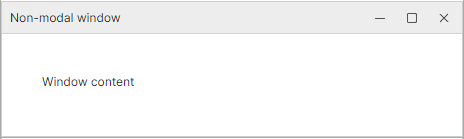
The following example uses the IWindowService service to show a non-modal window whose content is specified by a custom View.
See the complete code in the Controls Demo application.
Non-modal window's ViewModel
using Eremex.AvaloniaUI.Controls.ApplicationServices;

[ViewLocator(typeof(WindowServiceWindowView))]
public class WindowServiceWindowViewModel : WindowAwareViewModel
{
    private string statusText;

    public string StatusText
    {
        get => statusText;
        private set
        {
            if (statusText == value)
                return;

            statusText = value;
            OnPropertyChanged(nameof(StatusText));
        }
    }
}
Non-modal window's content (View)
<UserControl x:Class="DemoCenter.Views.ApplicationServices.WindowServiceWindowView"
             xmlns="https://github.com/avaloniaui"
             xmlns:x="http://schemas.microsoft.com/winfx/2006/xaml"
             xmlns:vm="using:DemoCenter.ViewModels.ApplicationServices"
             x:CompileBindings="True"
             x:DataType="vm:WindowServiceWindowViewModel"
             MinWidth="420">

    <StackPanel Margin="20" Spacing="12">
        <TextBlock Text="Window content"
                   TextWrapping="Wrap" />

    </StackPanel>
</UserControl>
Show the window
[RelayCommand]
private void ShowWindow()
{
    string windowTitle = "Non-modal window";
    Service<IWindowService>().Show(new WindowServiceWindowViewModel(windowTitle));
}
Define the Window's Content Directly
Use the ViewModel's Content property (WindowAwareViewModel.Content) to supply the window's content explicitly.
using Eremex.AvaloniaUI.Controls.ApplicationServices;

public class MyWindowViewModel : WindowAwareViewModel
{
    public MyWindowViewModel(string title) : base(title)
    {
        Content = "Window content";
    }
}
To show this window, use the following code:
Window's Title
You can specify the window title using one of the following approaches:
- Set the
captionparameter of theIWindowService.Showmethod. - Set the
Titleproperty of the window's ViewModel. This property is in effect if thecaptionparameter of theIWindowService.Showmethod isnull.
Owner Window
The owner is determined automatically through the IWindowsManager service. The active application window returned by this service becomes the target window's owner.