HyperlinkEditor
HyperlinkEditor 控件显示一个用户可以点击的超链接。当该链接被点击时,编辑器本身并不会执行该链接,而是引发一个关联的命令,你可以处理该命令来响应链接点击。
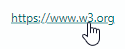
用户无法编辑编辑器的文本。
指定要显示的超链接
使用控件的 EditorValue 属性指定编辑器的显示文本。编辑器会为文本添加下划线以模拟超链接的样式。
如果没有为编辑器分配命令(见下文),点击显示的链接将不会产生任何效果。
处理超链接点击
将命令分配给编辑器的 Command 属性,即可处理对超链接的点击。使用 CommandParameter 为命令提供附加数据。
示例
以下示例定义了一个 HyperlinkEditor,用于显示一个指向网页的链接。点击该链接会引发 ShowWebPageCommand 命令。要打开的链接地址作为命令的参数传递。
xmlns:mxe="https://schemas.eremexcontrols.net/avalonia/editors"

<mxe:HyperlinkEditor EditorValue="https://www.w3.org" Command="{Binding ShowWebPageCommand}"
                     CommandParameter="https://www.w3.org"/>
using CommunityToolkit.Mvvm.ComponentModel;
using System.Diagnostics;

public partial class HyperlinkEditorPageViewModel : ObservableObject
{
    [RelayCommand]
    public void ShowWebPage(string parameter)
    {
        try
        {
            Process.Start(new ProcessStartInfo(parameter)
            {
                UseShellExecute = true
            });
        }
        catch { };
    }
}
* 本页面使用机器翻译技术翻译。