Key Tips
您可以按 ALT 键将焦点移动到 Ribbon 控件,然后使用键盘上的方向键在 Ribbon 界面中导航。
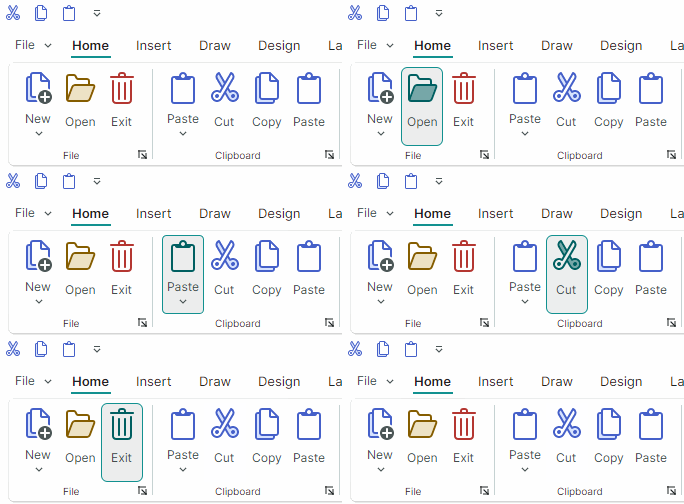
在键盘导航过程中,Ribbon 控件还支持使用 Key Tips 快速访问 Ribbon 元素。Key Tips 是按下 ALT 键时显示的访问键(一到三个字符)。它们允许用户快速使某个 Ribbon 元素获得焦点或将其激活。
按 ALT 键可显示顶级 Ribbon 元素(Ribbon 页面、Application Button、快速访问工具栏以及页面标题项)的 Key Tips。Key Tips 以小型工具提示的形式显示。
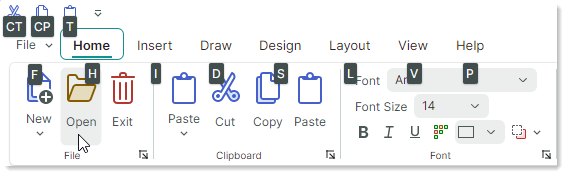
- 按下分配给某个命令的可见 Key Tip 会激活该命令。
- 按下分配给某个内嵌编辑器的可见 Key Tip 会将焦点移动到该编辑器。
- 按下分配给 Application Button 的可见 Key Tip 会调用关联的应用程序菜单/下拉控件。
- 按下分配给某个页面的可见 Key Tip,会显示该页面中各命令的 Key Tips。
例如,在上图所示的 Ribbon 控件状态下,按下“H”键会显示 Home 页面中命令的 Key Tips。
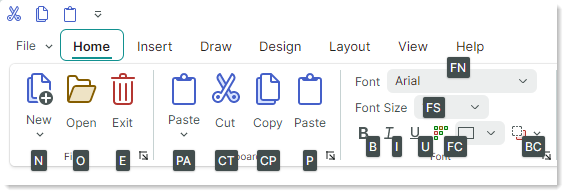
此时,您可以按下任意一个显示出来的 Key Tip,以激活活动页面中对应的命令。
-
按下当前不可见的 Key Tip 不会产生任何效果。
Tip
您可以使用
HotKey属性为 Ribbon 命令分配键盘快捷键(例如 CTRL+O、CTRL+B 等)。只要焦点位于快捷键的作用范围内(默认的快捷键作用范围由ToolbarManager组件的边界定义),这些快捷键就允许用户激活命令。有关详细信息,请参阅 Ribbon 项 - 快捷键。
在键盘导航期间返回上一步
要返回上一步并查看之前的 Key Tips,请按 Esc 键。
如果按错了字符,请按退格键将其删除。
取消键盘导航
- 反复按 ESC 键,直到 Key Tips 消失。
或者
- 将焦点移出 Ribbon 控件(例如,点击另一个控件)。
指定 Key Tips
以下属性允许您为 Ribbon 元素分配 Key Tips:
ToolbarItem.KeyTipRibbonPage.KeyTipRibbonControl.ApplicationButtonKeyTip
<!-- Specify a Key Tip for the Application Menu-->
<mxr:RibbonControl ApplicationButtonContent="File" ApplicationButtonKeyTip="F" Name="ribbon">
    <mxr:RibbonControl.ApplicationButtonDropDownControl>
        <!-- Define the Application Menu displayed when the Application Button is clicked
            or activated with the "F" Key Tip.
         -->
        <mxb:PopupMenu MinWidth="250" >
            <!-- ... -->
        </mxb:PopupMenu>
    </mxr:RibbonControl.ApplicationButtonDropDownControl>
    <!-- Specify a Key Tip for the Home Page -->
    <mxr:RibbonPage Header="Home" KeyTip="H">
        <mxr:RibbonPageGroup Header="File">
            <!-- Specify Key Tips for ribbon commands -->
            <mxb:ToolbarButtonItem Header="New" KeyTip="N" .../>
            <mxb:ToolbarButtonItem Header="Open" KeyTip="O".../>
        </mxr:RibbonPageGroup>
        <mxr:RibbonPageGroup Header="Clipboard">
            <mxb:ToolbarButtonItem Header="Paste" KeyTip="PA" .../>
            <mxb:ToolbarButtonItem Header="Cut" KeyTip="CT" .../>
        </mxr:RibbonPageGroup>
    </mxr:RibbonPage>
</mxr:RibbonControl>
请确保同时显示的 Key Tips 是唯一的。例如,您需要为 Ribbon 页面中的命令分配互不相同的 Key Tips。
* 本页面使用机器翻译技术翻译。