绑定到层级数据
在典型的层级数据源中,业务对象具有一个属性,用于存储子数据对象的集合。有两种方法可以在层级绑定模式下为 TreeList 和 TreeView 控件提供子数据:
动态数据加载
绑定到层级数据源时,TreeList 和 TreeView 控件默认按需加载节点:展开父节点时会动态加载子节点。
将 AllowDynamicDataLoading 属性设置为 false,可以在控件绑定到数据源后同时加载所有节点。
如果使用动态节点加载,TreeList 和 TreeView 控件将无法访问尚未加载的节点(及其底层数据)。这会对节点选中及筛选/搜索功能施加以下限制:
-
在递归模式下选中父节点时(参见
AllowRecursiveNodeChecking),控件会将该节点与当前已加载的子节点一起选中。控件不会选中尚未加载的子节点。 -
在内置搜索框中搜索数据,或使用自动筛选行筛选数据时,控件仅在当前已加载的节点中进行搜索。
指定子数据的路径
为 TreeList/TreeView 控件提供子数据的一种方法是指定业务对象中存储子数据的属性名称。为此,请使用 ChildrenFieldName 属性。例如,如果业务对象将子数据存储在 Items 集合中,请将 ChildrenFieldName 属性设置为“Items”。
您还需要将 HasChildrenFieldName 属性设置为一个属性的名称,该属性在业务对象具有子数据时返回 true,否则返回 false。此信息用于显示或隐藏节点展开按钮。
如果不指定 HasChildrenFieldName 属性,控件将为没有子节点的节点显示展开按钮,直到用户尝试展开这些节点为止。
以下示例演示了如何将 TreeList 控件绑定到数据。示例中的 Employee 对象具有包含子项的 Subordinates 集合。ChildrenFieldName 属性指定了存储子数据的属性名称(字符串“Subordinates”)。
xmlns:mxtl="https://schemas.eremexcontrols.net/avalonia/treelist"
...
<mxtl:TreeListControl Grid.Column="0" Width="400" Name="treeList1" >
    <mxtl:TreeListControl.Columns>
        <mxtl:TreeListColumn Name="colName" FieldName="Name" Header="Name" />
        <mxtl:TreeListColumn Name="colBirthdate" FieldName="Birthdate" Header="Birthdate"/>
    </mxtl:TreeListControl.Columns>
</mxtl:TreeListControl>
using CommunityToolkit.Mvvm.ComponentModel;

Employee p1 = new Employee() { Name = "Mark Douglas", Birthdate=new DateTime(1990, 01, 5) };
Employee p2 = new Employee() { Name = "Mary Watson", Birthdate = new DateTime(1985, 12, 17) };
Employee p3 = new Employee() { Name = "Alex Wude", Birthdate = new DateTime(2000, 10, 7) };
Employee p4 = new Employee() { Name = "Sam Louis", Birthdate = new DateTime(1975, 8, 27) };
Employee p5 = new Employee() { Name = "Dan Miller", Birthdate = new DateTime(1981, 3, 6) };
p1.Subordinates.Add(p2);
p1.Subordinates.Add(p3);
p2.Subordinates.Add(p4);
p3.Subordinates.Add(p5);

ObservableCollection<Employee> employees = new ObservableCollection<Employee>() { p1 };

treeList1.ChildrenFieldName = "Subordinates";
treeList1.HasChildrenFieldName = "HasChildren";

treeList1.ItemsSource = employees;

public partial class Employee : ObservableObject
{
    [ObservableProperty]
    public string name="";

    [ObservableProperty]
    public DateTime? birthdate=null;

    public ObservableCollection<Employee> Subordinates { get; } = new();

    public bool HasChildren { get { return Subordinates.Count > 0; } }
}
指定子项选择器
在层级绑定模式下提供子数据的另一种方法是实现一个 子项选择器(children selector)。该选择器指定业务对象中是否存在子数据,并按需返回这些子数据。TreeList/TreeView 控件使用选择器提供的信息来创建子节点并绘制节点展开按钮。
子项选择器在以下场景中很有用:
- 当父业务对象和子业务对象类型不同时
- 在所有其他无法通过
ChildrenFieldName属性指定子项路径的情况下。
使用 TreeListControlBase.ChildrenSelector 属性可以为 TreeList/TreeView 控件分配选择器。选择器是实现 ITreeListChildrenSelector 接口的对象:
public interface ITreeListChildrenSelector
{
    // The method should return whether a business object has child data.
    // The control uses this information to display or hide node expand buttons.
    bool HasChildren(object item) => true;
    // The method should return child objects for a business object.
    IEnumerable? SelectChildren(object item);
}
示例 — 实现一个简单的子项选择器
以下示例创建了一个选择器(MyTreeListChildrenSelector),为 TreeList 控件提供子项信息。
xmlns:mxtl="https://schemas.eremexcontrols.net/avalonia/treelist"
...
<Grid RowDefinitions="Auto, Auto, Auto, Auto" ColumnDefinitions="400, *">
    <Grid.Resources>
        <local:MyTreeListChildrenSelector x:Key="mySelector" />
    </Grid.Resources>

    <mxtl:TreeListControl Grid.Column="0" Name="treeList2"
     ChildrenSelector="{StaticResource mySelector}">
        <mxtl:TreeListControl.Columns>
            <mxtl:TreeListColumn Name="colName1" FieldName="Name" />
            <mxtl:TreeListColumn Name="colBirthdate1" FieldName="Birthdate"/>
        </mxtl:TreeListControl.Columns>
    </mxtl:TreeListControl>
</Grid>
using CommunityToolkit.Mvvm.ComponentModel;

Employee p1 = new Employee() { Name = "Mark Douglas", Birthdate = new DateTime(1990, 01, 5)};
Employee p2 = new Employee() { Name = "Mary Watson", Birthdate = new DateTime(1985, 12, 17)};
Employee p3 = new Employee() { Name = "Alex Wude", Birthdate = new DateTime(2000, 10, 7)};
Employee p4 = new Employee() { Name = "Sam Louis", Birthdate = new DateTime(1975, 8, 27)};
Employee p5 = new Employee() { Name = "Dan Miller", Birthdate = new DateTime(1981, 3, 6)};
p1.Subordinates.Add(p2);
p1.Subordinates.Add(p3);
p2.Subordinates.Add(p4);
p3.Subordinates.Add(p5);

ObservableCollection<Employee> employees = new ObservableCollection<Employee>() { p1 };

treeList2.ItemsSource = employees;

public class MyTreeListChildrenSelector : ITreeListChildrenSelector
{
    public bool HasChildren(object? item) => (item as Employee).HasChildren;
    public IEnumerable? SelectChildren(object? item) => (item as Employee).Subordinates;
}

public partial class Employee : ObservableObject
{
    [ObservableProperty]
    public string name="";

    [ObservableProperty]
    public DateTime? birthdate=null;

    public ObservableCollection<Employee> Subordinates = new();

    public bool HasChildren { get { return Subordinates.Count > 0; } }
}
当父业务对象和子业务对象不同时使用子项选择器
当父业务对象和子业务对象类型不同时,适用以下注意事项。
-
TreeList 显示 TreeList 列所绑定字段中的值(参见
TreeListColumn.FieldName)。父业务对象和子业务对象必须公开这些字段。 -
TreeView 控件显示业务对象中由
DataFieldName属性指定名称的字段中的值。请确保父数据对象和子数据对象都具有该字段。
示例 — 在业务对象不同的情况下实现子项选择器
假设一个 TreeView 控件绑定到 City 对象的集合。每个 City 对象拥有一个 Street 对象的集合,而每个 Street 对象又拥有 Building 对象的集合。TreeView 应在根级别显示城市,在第二级显示街道,在第三级显示建筑物编号。
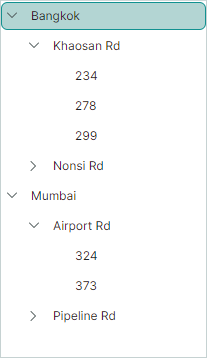
下面的代码展示了 City、Street 和 Building 业务对象的定义。
请注意,这些对象都具有 Name 属性。该属性的名称将在 XAML 中赋值给 TreeViewControl.DataFieldName 属性。
public class City
{
    public City(string name) { Name = name; }
    public string Name { get; set; }
    public ObservableCollection<Street> Streets = new();
}

public class Street
{
    public Street(string name, string[] buidingNumbers) {
        Name = name;
        foreach (string number in buidingNumbers)
        {
            Buildings.Add(new Building(number));
        }
    }
    public string Name { get; set; }
    public ObservableCollection<Building> Buildings = new();
}

public class Building
{
    public Building(string name) { Name = name; }
    public string Name { get; set; }
}
TreeView 控件绑定到视图模型中定义的 Cities 集合。TreeViewControl.DataFieldName 属性设置为 “Name”。该属性标识了业务对象中应在 TreeView 控件中显示其值的字段。
public partial class MainWindowViewModel : ViewModelBase
{
    [ObservableProperty]
    ObservableCollection<City> cities = new();
    //...
}
由于层级数据源中的业务对象类型不同,因此必须实现一个选择器来获取 TreeView 节点的子项。
public class MyTreeListChildrenSelector : ITreeListChildrenSelector
{
    public bool HasChildren(object item)
    {
        if (item is City city)
            return city.Streets.Count > 0;
        if (item is Street street)
            return street.Buildings.Count > 0;
        return false;
    }
    public IEnumerable? SelectChildren(object item)
    {
        if (item is City city)
            return city.Streets;
        if (item is Street street)
            return street.Buildings;
        return null;
    }
}
要将 MyTreeListChildrenSelector 选择器分配给 TreeView 控件,请使用 TreeListControlBase.ChildrenSelector 属性。
xmlns:local="clr-namespace:EremexAvaloniaApplication10.Views"

<mx:MxWindow.Resources>
    <local:MyTreeListChildrenSelector x:Key="mySelector" />
</mx:MxWindow.Resources>

<mxtl:TreeViewControl ...
    ChildrenSelector="{StaticResource mySelector}"
/>
完整代码
本示例的完整代码如下所示。
<!-- MainWindow.axaml -->

<mx:MxWindow xmlns="https://github.com/avaloniaui"
        xmlns:x="http://schemas.microsoft.com/winfx/2006/xaml"
        xmlns:vm="using:EremexAvaloniaApplication10.ViewModels"
        xmlns:d="http://schemas.microsoft.com/expression/blend/2008"
        xmlns:mc="http://schemas.openxmlformats.org/markup-compatibility/2006"
        xmlns:mx="https://schemas.eremexcontrols.net/avalonia"
        xmlns:mxtl="https://schemas.eremexcontrols.net/avalonia/treelist"
        mc:Ignorable="d" d:DesignWidth="800" d:DesignHeight="450"
        x:Class="EremexAvaloniaApplication10.Views.MainWindow"
        x:DataType="vm:MainWindowViewModel"
        Icon="/Assets/EMXControls.ico"
        Title="EremexAvaloniaApplication10"
        xmlns:local="clr-namespace:EremexAvaloniaApplication10.Views"
        >

    <Design.DataContext>
        <vm:MainWindowViewModel/>
    </Design.DataContext>

    <mx:MxWindow.Resources>
        <local:MyTreeListChildrenSelector x:Key="mySelector" />
    </mx:MxWindow.Resources>

    <mxtl:TreeViewControl Name="treeView"
                          ItemsSource="{Binding Cities}"
                          DataFieldName="Name"
                          ChildrenSelector="{StaticResource mySelector}"
                          />
</mx:MxWindow>
//MainWindow.axaml.cs

using Avalonia.Controls;
using Eremex.AvaloniaUI.Controls.Common;
using Eremex.AvaloniaUI.Controls.TreeList;
using EremexAvaloniaApplication10.ViewModels;
using System.Collections;

namespace EremexAvaloniaApplication10.Views
{
    public partial class MainWindow : MxWindow
    {
        public MainWindow()
        {
            InitializeComponent();
        }
    }

    public class MyTreeListChildrenSelector : ITreeListChildrenSelector
    {
        public bool HasChildren(object item)
        {
            if (item is City city)
                return city.Streets.Count > 0;
            if (item is Street street)
                return street.Buildings.Count > 0;
            return false;
        }
        public IEnumerable? SelectChildren(object item)
        {
            if (item is City city)
                return city.Streets;
            if (item is Street street)
                return street.Buildings;
            return null;
        }
    }
}
//MainWindowViewModel.cs

using CommunityToolkit.Mvvm.ComponentModel;
using DynamicData;
using System.Collections.ObjectModel;
using System.Security.Cryptography;

namespace EremexAvaloniaApplication10.ViewModels
{
    public partial class MainWindowViewModel : ViewModelBase
    {
        [ObservableProperty]
        ObservableCollection<City> cities = new();

        public MainWindowViewModel()
        {
            Street s1 = new Street("Khaosan Rd", new string[] { "234", "278", "299" });
            Street s2 = new Street("Nonsi Rd", new string[] { "678", "639" });
            Street s3 = new Street("Airport Rd", new string[] { "324", "373" } );
            Street s4 = new Street("Pipeline Rd", new string[] { "111", "185" });

            City c1 = new City("Bangkok");
            City c2 = new City("Mumbai");

            c1.Streets.Add(s1);
            c1.Streets.Add(s2);
            c2.Streets.Add(s3);
            c2.Streets.Add(s4);

            cities.AddRange(new[] { c1, c2 });
        }
    }

    public class City
    {
        public City(string name) { Name = name; }
        public string Name { get; set; }
        public ObservableCollection<Street> Streets = new();
    }

    public class Street
    {
        public Street(string name, string[] buildingNumbers) {
            Name = name;
            foreach (string number in buildingNumbers)
            {
                Buildings.Add(new Building(number));
            }
        }
        public string Name { get; set; }
        public ObservableCollection<Building> Buildings = new();
    }

    public class Building
    {
        public Building(string name) { Name = name; }
        public string Name { get; set; }
    }
}
另请参阅
* 本页面使用机器翻译技术翻译。