绑定到自引用数据源
您可以使用自引用数据源对记录之间的层次结构关系进行编码。自引用数据源是一个平面列表或记录集合。它的记录有两个指定父子关系的服务属性:
- 关键字段 — 唯一的记录标识符(简单数据类型;例如,整数)。
- 父键字段 — 父记录的_键字段_。
下图演示了自引用数据表的示例,以及在设置该控件的专用设置后显示此数据的 TreeList 控件。
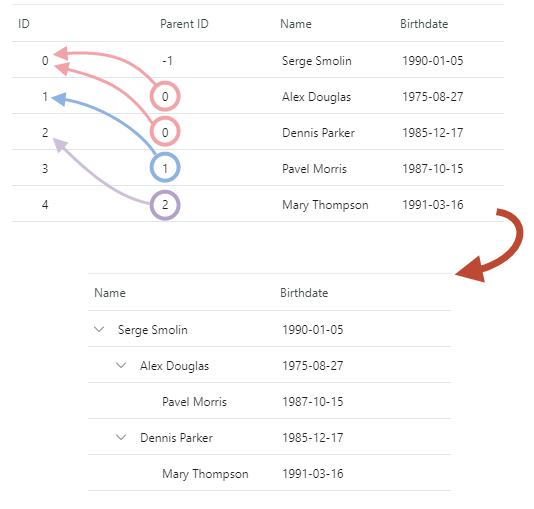
应显示为根节点(在根级别)的所有记录都将“父键字段”设置为相同的根值。根值必须是唯一的——它不能与数据源中的任何关键字段匹配。
要将 TreeList/TreeView 控件绑定到自引用数据源,请执行以下操作:
- 确保数据源记录具有两个指定“键”字段和“父键字段”的公共属性。
- 将该控件的
TreeListControlBase.KeyFieldName属性设置为键字段名称。 - 将该控件的
TreeListControlBase.ParentFieldName属性设置为_父键字段_名称。 - 将该控件的
TreeListControlBase.RootValue属性设置为为数据源中的根记录定义的根值。
服务栏的可见性
TreeList 默认情况下不创建绑定到服务关键字段的列。要允许该控件自动创建绑定到指定_键字段_和_父键字段_的列,请将 AutoGenerateColumns 和 AutoGenerateServiceColumns 属性设置为 true。
例子
以下示例将 TreeList 控件绑定到自引用数据源(Employee 记录的集合)。Employee 类定义了两个属性(ID 和 ParentID),分别指定记录的_键字段_和_父键字段_。根记录的_父键字段_设置为 -1,因此该控件的 RootValue 属性设置为该值。
xmlns:mxtl="https://schemas.eremexcontrols.net/avalonia/treelist"
...
<mxtl:TreeListControl Grid.Column="0" Name="treeList2">
    <mxtl:TreeListControl.Columns>
        <mxtl:TreeListColumn Name="colName1" FieldName="Name" />
        <mxtl:TreeListColumn Name="colBirthdate1" FieldName="Birthdate" >
            <mxtl:TreeListColumn.EditorProperties>
                <mxe:TextEditorProperties DisplayFormatString="yyyy-MM-dd"/>
            </mxtl:TreeListColumn.EditorProperties>

        </mxtl:TreeListColumn>
    </mxtl:TreeListControl.Columns>
</mxtl:TreeListControl>
using CommunityToolkit.Mvvm.ComponentModel;

ObservableCollection<Employee> employees = new ObservableCollection<Employee>();
employees.Add(new Employee() {
    ID = 0, ParentID = -1, Name = "Serge Smolin", Birthdate = new DateTime(1990, 01, 5)});
employees.Add(new Employee() {
    ID = 1, ParentID = 0, Name = "Alex Douglas", Birthdate = new DateTime(1975, 8, 27)});
employees.Add(new Employee() {
    ID = 2, ParentID = 0, Name = "Dennis Parker", Birthdate = new DateTime(1985, 12, 17)});
employees.Add(new Employee() {
    ID = 3, ParentID = 1, Name = "Pavel Morris", Birthdate = new DateTime(1987, 10, 15)});
employees.Add(new Employee() {
    ID = 4, ParentID = 2, Name = "Mary Thompson", Birthdate = new DateTime(1991, 03, 16)});
employees.Add(new Employee() {
    ID = 5, ParentID = 3, Name = "Vera Liskina", Birthdate = new DateTime(1991, 04, 16)});

treeList2.KeyFieldName = "ID";
treeList2.ParentFieldName = "ParentID";
treeList2.RootValue = -1;

treeList2.ItemsSource = employees;

public partial class Employee : ObservableObject
{
    [ObservableProperty]
    public string name = "";

    [ObservableProperty]
    public DateTime? birthdate = null;

    public int ID { get; set; }

    public int ParentID { get; set; }

}
另请参阅
* 本页面使用机器翻译技术翻译。