SegmentedEditor
SegmentedEditor 将一组项目(选项)呈现为一系列水平排列的分段。用户可以单击其中一个分段来选择相应的选项,或者按住 CTRL 键并单击已选中的分段来清除选择。
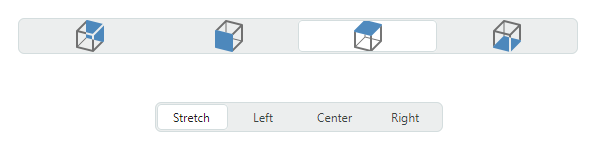
该控件的主要功能包括:
- 从字符串列表、业务对象列表或枚举类型填充分段。
- 项目模板允许您以自定义方式呈现分段。
- 将该控件用作容器控件(例如 TreeList、TreeView 和 PropertyGrid)内的内嵌编辑器。
指定项目来源
使用 SegmentedEditor.ItemsSource 属性指定用于创建控件分段的项目源。您可以将编辑器绑定到字符串列表、业务对象列表或枚举类型。
绑定到字符串列表
最简单的项目源是一个字符串列表。
示例 - 如何绑定到字符串列表
以下示例使用字符串列表填充 SegmentedEditor 控件。
xmlns:mxe="https://schemas.eremexcontrols.net/avalonia/editors"
xmlns:sys="clr-namespace:System;assembly=mscorlib"
xmlns:col="using:System.Collections"

<mxe:SegmentedEditor>
    <mxe:SegmentedEditor.ItemsSource>
        <col:ArrayList>
            <sys:String>Montevideo</sys:String>
            <sys:String>Havana</sys:String>
            <sys:String>Santiago</sys:String>
            <sys:String>La Paz</sys:String>
        </col:ArrayList>
    </mxe:SegmentedEditor.ItemsSource>
</mxe:SegmentedEditor>
绑定到业务对象列表
您可以将 SegmentedEditor 控件绑定到业务对象列表。在这种情况下,该控件的默认行为如下:
- 业务对象的
ToString方法指定项目的默认文本表示形式。 - 当您选择项目时,编辑器的值 (
SegmentedEditor.EditorValue) 将设置为相应的业务对象。
一个典型的业务对象具有多个属性。您可以指定由哪些业务对象属性提供项目显示文本和编辑值。为此请使用以下 API 成员:
SegmentedEditor.DisplayMember- 获取或设置业务对象中用于指定项目显示文本的属性名称。SegmentedEditor.ValueMember- 获取或设置业务对象中用于指定项目值的属性名称。当您选择项目时,编辑器的值 (SegmentedEditor.EditorValue) 将设置为该项目的ValueMember属性值。
示例 - 如何绑定到业务对象列表
以下示例将 SegmentedEditor 控件绑定到 Product 业务对象列表。 Product.ProductName 属性指定项目显示文本。 Product.ProductID 属性指定项目值。
xmlns:mxe="https://schemas.eremexcontrols.net/avalonia/editors"
xmlns:sys="clr-namespace:System;assembly=mscorlib"

<Window.DataContext>
    <local:MainViewModel/>
</Window.DataContext>

<mxe:SegmentedEditor
    Name="segmEditor1"
    ItemsSource="{Binding Products}"
    DisplayMember="ProductName"
    ValueMember="ProductID" />
public MainViewModel()
{
    Products = new ObservableCollection<Product>();
    Products.Add(new Product(0, "Chai", "Beverages", 200));
    Products.Add(new Product(1, "Chang", "Beverages", 100))
    Products.Add(new Product(3, "Ikura", "Seafood", 500));
    Products.Add(new Product(5, "Tofu", "Produce", 430));
    //...
}

public partial class Product :ObservableObject
{
    public Product(int productID, string productName, string category, int productPrice)
    {
        ProductID = productID;
        ProductName = productName;
        Category = category;
        ProductPrice = productPrice;
    }

    [ObservableProperty]
    public int productID;

    [ObservableProperty]
    public string productName;

    [ObservableProperty]
    public string category;

    [ObservableProperty]
    public decimal productPrice;
}
绑定到枚举
SegmentedEditor 可以用枚举类型的值填充其段。
Eremex.AvaloniaUI.Controls.Common.EnumItemsSource 帮助程序类有助于绑定到枚举。其主要特点包括:
- 枚举成员的图像。将
Eremex.AvaloniaUI.Controls.Common.ImageAttribute属性应用于目标枚举成员以指定图像。 - 枚举成员的自定义显示名称。使用
System.ComponentModel.DataAnnotations.DisplayAttribute属性或自定义转换器更改默认的项目显示文本。 - 项目的工具提示。工具提示包含目标项目的描述,您可以使用
System.ComponentModel.DataAnnotations.DisplayAttribute属性或自定义转换器来提供该描述。
使用以下 EnumItemsSource 属性设置与枚举类型的绑定:
EnumItemsSource.EnumType— 指定其值将显示在SegmentedEditor控件中的枚举类型。EnumItemsSource.ShowImages— 指定是否显示枚举成员的图像。您可以使用Eremex.AvaloniaUI.Controls.Common.ImageAttribute属性来提供图像。EnumItemsSource.ShowNames— 指定是否显示项目文本。将ShowNames设置为false并将ShowImages设置为true以使用不带文本的图像呈现枚举成员。EnumItemsSource.ImageSize— 指定分配给枚举成员的图像的显示尺寸。EnumItemsSource.NameToDisplayTextConverter— 允许您分配一个转换器,用于检索枚举成员的自定义显示文本。EnumItemsSource.NameToDescriptionConverter— 允许您分配一个转换器来检索枚举成员描述,当用户将鼠标悬停在段上时,这些描述将显示为工具提示。
示例 - 如何显示枚举值,以及如何使用特性为枚举成员提供显示文本和图像
以下示例显示 SegmentedEditor 中的 ProductCategoryEnum 枚举的值。它使用 EnumItemsSource 类进行数据绑定。
System.ComponentModel.DataAnnotations.DisplayAttribute 和 Eremex.AvaloniaUI.Controls.Common.ImageAttribute 属性指定枚举成员的自定义显示文本、描述(工具提示)和图像。
xmlns:mx="https://schemas.eremexcontrols.net/avalonia"
xmlns:mxe="https://schemas.eremexcontrols.net/avalonia/editors"

<mxe:SegmentedEditor Name="segmentedEditorEnum"
        ItemsSource="{mx:EnumItemsSource EnumType=local:ProductCategoryEnum,
         ImageSize='16, 16', ShowImages=True, ShowNames=True}">
</mxe:SegmentedEditor>
using Eremex.AvaloniaUI.Controls.Common;
using System.ComponentModel.DataAnnotations;

public enum ProductCategoryEnum
{
    // The images assigned to the enumeration values below are placed
    // in the EditorsSample/Images folder.
    // They have their "Build Action" properties set to "AvaloniaResource".
    [Image($"avares://EditorsSample/Images/Products/DairyProducts.svg")]
    [Display(Name = "Dairy Products", Description = "Products made from milk")]
    DairyProducts,

    [Image($"avares://EditorsSample/Images/Products/Beverages.svg")]
    [Display(Description = "Edible drinks")]
    Beverages,

    [Image($"avares://EditorsSample/Images/Products/Condiments.svg")]
    [Display(Description = "Flavor Enhancers")]
    Condiments,

    [Image($"avares://EditorsSample/Images/Products/Confections.svg")]
    [Display(Description = "Sweets")]
    Confections
}
示例 - 如何显示枚举值,并使用自定义转换器为枚举成员提供显示文本
以下示例使用 EnumItemsSource 类在 SegmentedEditor 控件中显示枚举类型的值。 EnumItemsSource.NameToDisplayTextConverter 和 EnumItemsSource.NameToDescriptionConverter 对象为枚举成员提供自定义显示文本和说明(工具提示)。
xmlns:mxe="https://schemas.eremexcontrols.net/avalonia/editors"
xmlns:mx="https://schemas.eremexcontrols.net/avalonia"
xmlns:local="clr-namespace:EditorsSample"

<mxe:SegmentedEditor Name="segmentedEditorEnumWithConverters"
        ItemsSource="{mx:EnumItemsSource EnumType=local:ProductCategoryEnum,
         ImageSize='16, 16', ShowImages=True, ShowNames=True,
         NameToDisplayTextConverter={local:EnumMemberNameToDisplayTextConverter},
         NameToDescriptionConverter={local:EnumMemberNameToDescriptionConverter}}"
        >
</mxe:SegmentedEditor>
using Eremex.AvaloniaUI.Controls.Common;

public enum ProductCategoryEnum
{
    // The images assigned to the enumeration values below are placed
    // in the EditorsSample/Images folder.
    // They have their "Build Action" properties set to "AvaloniaResource".
    [Image($"avares://EditorsSample/Images/Products/DairyProducts.svg")]
    DairyProducts,

    [Image($"avares://EditorsSample/Images/Products/Beverages.svg")]
    Beverages,

    [Image($"avares://EditorsSample/Images/Products/Condiments.svg")]
    Condiments,

    [Image($"avares://EditorsSample/Images/Products/Confections.svg")]
    Confections
}

public class EnumMemberNameToDisplayTextConverter : BaseEnumConverter
{
    protected override void PopulateDictionary()
    {
        TextValueDictionary.Add("ProductCategoryEnum_DairyProducts", "Dairy");
    }
}
public class EnumMemberNameToDescriptionConverter : BaseEnumConverter
{
    protected override void PopulateDictionary()
    {
        TextValueDictionary.Add("ProductCategoryEnum_DairyProducts", "Milk Products");
    }
}

public abstract class BaseEnumConverter : MarkupExtension, IValueConverter
{
    protected Dictionary<string, string> TextValueDictionary;

    public BaseEnumConverter()
    {
        TextValueDictionary = new Dictionary<string, string>();
        PopulateDictionary();
    }

    protected abstract void PopulateDictionary();

    public override object ProvideValue(IServiceProvider serviceProvider)
    {
        return this;
    }
    public object? Convert(object? value, Type targetType, object? parameter,
     System.Globalization.CultureInfo culture)
    {
        var type = value?.GetType();
        var memberName = value?.ToString();
        if (type == null || !type.IsEnum || string.IsNullOrEmpty(memberName))
            return null;
        return EnumMemberToString(type.Name, memberName);
    }

    protected virtual string EnumMemberToString(string enumName, string enumMemberName)
    {
        string fullMemberName = enumName + "_" + enumMemberName;
        if (TextValueDictionary.ContainsKey(fullMemberName))
            return TextValueDictionary[fullMemberName];
        else
            return enumMemberName;
    }

    public object? ConvertBack(object? value, Type targetType, object? parameter,
     System.Globalization.CultureInfo culture)
    {
        return null;
    }
}
获取和设置所选项目,并指定编辑器值
当用户按住 CTRL 键并单击某个段来选择或取消选择该段时,SegmentedEditor.SelectedItem 和 SegmentedEditor.EditorValue 属性会相应更改。
您可以使用这些属性中的任何一个来获取和设置编辑器的选定值。
SegmentedEditor.SelectedItem 属性指定所选段对应的底层数据对象。
SegmentedEditor.EditorValue 属性具有以下含义:
- 如果
ValueMember属性为空,则EditorValue和SelectedItem属性等效。 - 否则,
EditorValue属性将与所选底层数据对象的ValueMember属性值同步。
要清除选择,请将 SegmentedEditor.SelectedItem 属性设置为 null。
示例 - 当 SegmentedEditor 绑定到字符串列表时如何选择项目
以下示例演示如何使用 SelectedItem 或 EditorValue 属性在绑定到字符串列表的 SegmentedEditor 控件中选择项目。
xmlns:mxe="https://schemas.eremexcontrols.net/avalonia/editors"
xmlns:sys="clr-namespace:System;assembly=mscorlib"
xmlns:col="using:System.Collections"

<mxe:SegmentedEditor Name="segmEditorStrings">
    <mxe:SegmentedEditor.ItemsSource>
        <col:ArrayList>
            <sys:String>Montevideo</sys:String>
            <sys:String>Havana</sys:String>
            <sys:String>Santiago</sys:String>
            <sys:String>La Paz</sys:String>
        </col:ArrayList>
    </mxe:SegmentedEditor.ItemsSource>
</mxe:SegmentedEditor>
// Use the SelectedItem property:
segmEditorStrings.SelectedItem = "Santiago";
//or the EditorValue property:
segmEditorStrings.EditorValue = "Santiago";
示例 - 当 SegmentedEditor 绑定到业务对象列表时如何选择 item
在以下示例中,SegmentedEditor 控件绑定到 Product 对象列表。 ValueMember 属性引用 Product.ProductID 成员。因此,产品 ID 用作项目值。当用户选择某个分段时,EditorValue 属性将设置为相应的产品 ID。该示例使用 EditorValue 属性在代码中选择项目。
xmlns:mxe="https://schemas.eremexcontrols.net/avalonia/editors"
xmlns:sys="clr-namespace:System;assembly=mscorlib"
xmlns:local="clr-namespace:EditorsSample"

<Window.DataContext>
    <local:MainViewModel/>
</Window.DataContext>

<mxe:SegmentedEditor
    Name="segmEditor1"
    ItemsSource="{Binding Products}"
    DisplayMember="ProductName"
    ValueMember="ProductID" />
// Select an item by its product ID:
var itemSource = segmEditor1.ItemsSource as ObservableCollection<Product>;
if (itemSource != null)
    segmEditor1.EditorValue = itemSource[3].ProductID;
//The SelectedItem property will return the itemSource[3] object.

//...
[ObservableObject]
public partial class MainViewModel : ViewModelBase
{
    [ObservableProperty]
    public ObservableCollection<Product> products;

    public MainViewModel()
    {
        Products = new ObservableCollection<Product>();
        Products.Add(new Product(0, "Chai", "Beverages", 200));
        Products.Add(new Product(1, "Chang", "Beverages", 100))
        Products.Add(new Product(3, "Ikura", "Seafood", 500));
        Products.Add(new Product(5, "Tofu", "Produce", 430));
    }
}

public partial class Product :ObservableObject
{
    public Product(int productID, string productName, string category, int productPrice)
    {
        ProductID = productID;
        ProductName = productName;
        Category = category;
        ProductPrice = productPrice;
    }

    [ObservableProperty]
    public int productID;

    [ObservableProperty]
    public string productName;

    [ObservableProperty]
    public string category;

    [ObservableProperty]
    public decimal productPrice;
}
指定项目模板
当 SegmentedEditor 绑定到字符串或业务对象列表时,control 的段显示 default text representation 项目。 default item display text 定义如下:
- 如果未设置
ValueMember属性,则由 underlying 数据对象的ToStringmethod 返回的值。 - 否则,存储在数据对象的
ValueMember属性中的值的文本表示形式。
项目模板使您可以灵活地指定在编辑器的片段中显示的内容。它们允许您显示图像以及段中多个属性的值。使用 SegmentedEditor.ItemTemplate 属性指定 item 模板。
示例 - 如何显示 image 和 SegmentedEditor 项目的文本
以下示例演示如何创建在 SegmentedEditor control 的段中显示图像和文本的 item 模板。
在示例中,SegmentedEditor control 绑定到 CapitalInfo 对象的集合,该对象存储有关国家、国家首都和国旗的信息。
创建的 item 模板(SegmentedEditor.ItemTemplate 属性)显示国旗,后跟国家首都的名称。
SegmentedEditor.ValueMember 属性引用 CapitalInfo.Capital 属性。当用户选择一个段时,编辑器的 EditorValue 属性将设置为相应国家/地区首都的名称。
xmlns:mxe="https://schemas.eremexcontrols.net/avalonia/editors"
xmlns:local="clr-namespace:EditorsSample"

<Window.DataContext>
    <local:MainViewModel/>
</Window.DataContext>

<Window.Resources>
    <DataTemplate x:Key="CapitalItemTemplate">
        <Grid>
            <Grid.ColumnDefinitions>
                <ColumnDefinition Width="Auto"/>
                <ColumnDefinition Width="*"/>
            </Grid.ColumnDefinitions>
            <Image Width="16" Height="16" Source="{Binding Path=Flag}"/>
            <TextBlock VerticalAlignment="Center" Grid.Column="1"
             Margin="6,0,0,0" Text="{Binding Path=Capital}"/>
        </Grid>
    </DataTemplate>
</Window.Resources>

<mxe:SegmentedEditor
    Name="segmentedEditorCapitals"
    ItemsSource="{Binding Capitals}"
    ItemTemplate="{StaticResource CapitalItemTemplate}"
    ValueMember="Capital"
/>
using CommunityToolkit.Mvvm.ComponentModel;
using Avalonia.Media;
using Avalonia.Svg.Skia;
using Eremex.AvaloniaUI.Controls.Utils;

public partial class MainViewModel
{
    [ObservableProperty]
    public ObservableCollection<CapitalInfo> capitals;

    public MainViewModel()
    {
        var capitalDictionary = new List<(string capital, string country)>();
        capitalDictionary.Add(("Havana", "Cuba"));
        capitalDictionary.Add(("Santiago", "Chile"));
        capitalDictionary.Add(("La Paz", "Bolivia"));
        Capitals = new ObservableCollection<CapitalInfo>();
        foreach (var item in capitalDictionary)
        {
            string country = item.country.ToLower();
            // Load .SVG images that are stored in the Images/Flags folder as Avalonia Resources.
            IImage image = ImageLoader.LoadSvgImage(Assembly.GetExecutingAssembly(), $"Images/Flags/{country}.svg");
            Capitals.Add(new CapitalInfo(item.capital, item.country, image));
        }
    }
}

public partial class CapitalInfo : ObservableObject
{
    public CapitalInfo(string capital, string country, IImage flag)
    {
        Capital = capital;
        Flag = flag;
        Country = country;
    }

    [ObservableProperty]
    public string capital;

    [ObservableProperty]
    public string country;

    [ObservableProperty]
    public IImage flag;
}
* 本页面使用机器翻译技术翻译。