数据编辑
默认就地 Eremex 编辑器
如果没有显式指定行的 in-place 编辑器,则 PropertyGrid control 使用 in-place Eremex 编辑器来显示和编辑常见数据类型的行值。
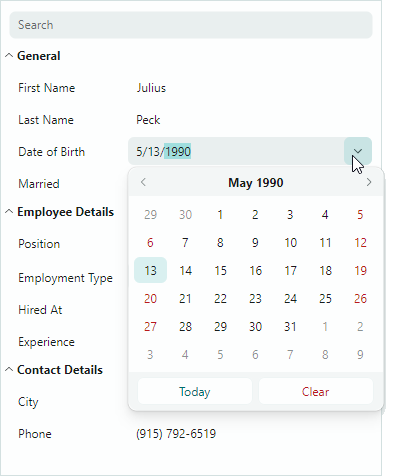
以下列表显示了具有常见数据类型的 Eremex 编辑器 associated:
- 布尔值 —
CheckEditor - 双值 —
SpinEditor - 枚举值 —
ComboBoxEditor - 具有
TypeConverter属性且TypeConverter.GetStandardValuesSupportedmethod 返回true—ComboBoxEditor的属性 - 其他值 —
TextEditor
当 in-place Eremex 编辑器激活时,您可以动态访问和修改这些编辑器的实例。有关更多详细信息,请参阅 Access the Active In-place Eremex Editor 部分。
分配就地 Eremex 编辑器
如果需要覆盖 default editor assignment,或者在 XAML 或代码隐藏中自定义行编辑器,则可以将 in-place Eremex 编辑器显式分配给行。
为此目的,请使用 PropertyGridRow.EditorProperties 属性,如下所示:
-
创建并自定义辅助程序
...EditorProperties类的实例,该类存储特定于所需 in-place 编辑器的设置。这些辅助类都是BaseEditorProperties的后代:ButtonEditorProperties— 包含特定于ButtonEditor控件的设置。CheckEditorProperties— 包含特定于CheckEditor控件的设置。ColorEditorProperties— 包含特定于ColorEditor控件的设置。ComboBoxEditorProperties— 包含特定于ComboBoxEditor控件的设置。HyperlinkEditorProperties— 包含特定于HyperlinkEditor控件的设置。PopupColorEditorProperties— 包含特定于PopupColorEditor控件的设置。PopupEditorProperties— 包含特定于PopupEditor控件的设置。SegmentedEditorProperties— 包含特定于SegmentedEditor控件的设置。SpinEditorProperties— 包含特定于SpinEditor控件的设置。TextEditorProperties— 包含特定于TextEditor控件的设置。
-
将
PropertyGridRow.EditorProperties属性设置为创建的...EditorProperties实例。
xmlns:mxpg="https://schemas.eremexcontrols.net/avalonia/propertygrid"
xmlns:mxe="https://schemas.eremexcontrols.net/avalonia/editors"

<mxpg:PropertyGridRow FieldName="OrderNo">
    <mxpg:PropertyGridRow.EditorProperties >
        <mxe:ButtonEditorProperties TextWrapping="Wrap" />
    </mxpg:PropertyGridRow.EditorProperties>
</mxpg:PropertyGridRow>
PropertyGridRow.CellTemplate 属性是将 Eremex 编辑器分配给行的另一种方法。确保 Eremex 编辑器的 x:Name 属性设置为 “PART_Editor”。在这种情况下,PropertyGrid 自动将编辑器的 EditorValue 属性绑定到行的绑定字段。此外,PropertyGrid 开始维护 in-place 编辑器的外观设置(活动和非活动状态下的边框可见性和前景色)。
xmlns:mxpg="https://schemas.eremexcontrols.net/avalonia/propertygrid"
xmlns:mxe="https://schemas.eremexcontrols.net/avalonia/editors"
...
<mxpg:PropertyGridRow FieldName="Caption">
    <mxpg:PropertyGridRow.CellTemplate>
        <DataTemplate>
            <mxe:ButtonEditor x:Name="PART_Editor">
                <mxe:ButtonEditor.Buttons>
                    <mxe:ButtonSettings Content="..."/>
                </mxe:ButtonEditor.Buttons>
            </mxe:ButtonEditor>
        </DataTemplate>
    </mxpg:PropertyGridRow.CellTemplate>
</mxpg:PropertyGridRow>
自定义编辑器
PropertyGrid 允许您为行单元指定自定义编辑器。您可以将编辑器直接分配给特定行,或者根据行的 underlying 对象的数据类型动态地将编辑器分配给行。 有关详细信息,请参阅以下主题:Custom Editors。
访问活动就地 Eremex 编辑器
ActiveEditor属性 — 返回活动的 in-place 编辑器。
为了提高 control 的性能,PropertyGrid 在显示模式下渲染单元格值时(文本编辑未激活时)使用 in-place Eremex 编辑器的轻量级版本。当在单元格中编辑 operation starts 文本时,in-place 编辑器从轻量级版本切换到全功能版本。在这种情况下,您可以使用 ActiveEditor 属性来访问 Eremex 编辑器实例。当行单元格失去焦点时,编辑器切换回其轻量级版本,并且 ActiveEditor 属性返回 null。
ShowingEditor事件 — 允许您在行单元格中开始编辑操作时接收通知。您可以安全地访问ShowingEditor事件处理程序中的ActiveEditor属性。
显示单元格编辑器
ShowEditormethod — 激活焦点行中的单元格编辑器。ShowingEditor事件 — 允许您防止用户在特定情况下激活单元格编辑器。处理ShowingEditor事件时,将Cancel事件参数设置为true以禁用编辑器激活。
关闭活动就地编辑器
CloseEditormethod — 保存在单元格编辑器中所做的更改并关闭编辑器。-
HideEditormethod — 关闭单元格编辑器而不保存任何更改。 -
HiddenEditor事件 — 在活动单元格编辑器关闭后触发。
保存在就地编辑器中所做的更改
CloseEditormethod — 保存在单元格编辑器中所做的更改并关闭编辑器。PostEditormethod — 保存在活动单元格编辑器中所做的更改,而不关闭编辑器。
* 本页面使用机器翻译技术翻译。